

Project Transactions
All projects that have been paid are organized in transactions in your Manage Payments & Billing section. Below is what each project payment will look like collapsed: Here you can view the date and time of your payment in your local timezone, along with the project name and the amount paid.
Once you click on each project transaction you will see the full project breakdown like below:
Here you can view the date and time of your payment in your local timezone, along with the project name and the amount paid.
Once you click on each project transaction you will see the full project breakdown like below:
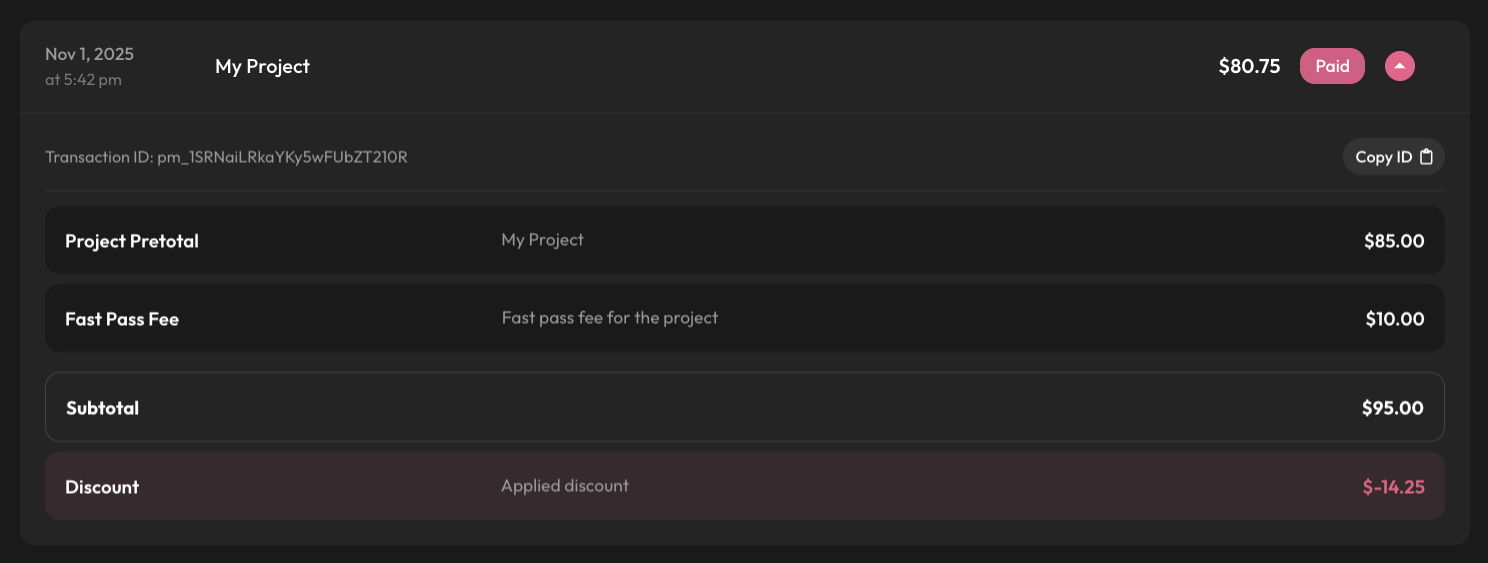 Here you can now see the following:
Transaction ID - The ID of the payment associated to this project
Here you can now see the following:
Transaction ID - The ID of the payment associated to this project Project Pretotal- The total of the project before fees applied
Fast Pass Fee - You will only see this fee if you have selected fast pass for an edit in the project
Subtotal - The total of the project before discounts
Discount - The applied discount amount at checkout (if applied) If you ever need help with a transaction or notice incorrect pricing or any issue related to billing you can always click Copy ID on a transaction and start a chat with us at anytime to further look into the issue!
Want to view your transactions?
If you are logged into your M.Tune account click here to be taken right to your Project Transactions! If you are not logged in it will first redirect you to login to continue.